 Mellow Machines
 A local example that receives build events, applies a rule immediately and asks a scripted brain what to do next. You can inspect the loop without an ESP32 board, model key or network inference.
Before you start
The current MellowHarness package runs on a Mac host. Its README specifies macOS 13 or later and the 6.2 toolchain supplied by Xcode 26 or its Command Line Tools. See the repository’s current setup requirements before building.
This guide follows the public README. The terminal example below is a scripted demonstration, not a measurement of Jev or a physical lamp.
1. Build the harness
Clone the repository and build its command-line examples:
git clone https://github.com/Mellow-Machines-Lab/MellowHarness.git
cd MellowHarness
swift build
2. Start the example
Beacon is a small example of a desk light responding to build results. In your first terminal, run:
.build/debug/beacon listen --socket /tmp/bcn.sockKeep this terminal open. Beacon listens for events on the named local socket and uses ScriptedBrain to answer its questions.
3. Send two failures and a success
Open a second terminal in the same repository folder. Send three events to the socket:
.build/debug/mellowharness-emit --socket /tmp/bcn.sock ci build_failed branch=main
.build/debug/mellowharness-emit --socket /tmp/bcn.sock ci build_failed branch=main
.build/debug/mellowharness-emit --socket /tmp/bcn.sock ci build_passed branch=main
The first terminal shows the event, the immediate rule and the scripted decision. The README’s example output is:
▸ 1 build_failed: The build on main failed.
  ✓ flash: Beacon flashed red on its own.
  pass scripted: play none · tone calm
▸ 4 build_failed: The build on main failed again, 2 in a row.
  ✓ flash: Beacon flashed red on its own.
  pass scripted: play none · tone calm
▸ 7 build_passed: The build on main passed after 2 failures.
  ✓ flash: Beacon flashed green on its own.
  … play: Beacon cheered.
  pass scripted: play cheer · tone calm
Here, “flash” and “cheer” are application outcomes reported by the example. Connecting them to a real device is an application integration.
4. Inspect what the brain sees
Run Beacon without arguments to play the example on a virtual clock and print its events and prompts:
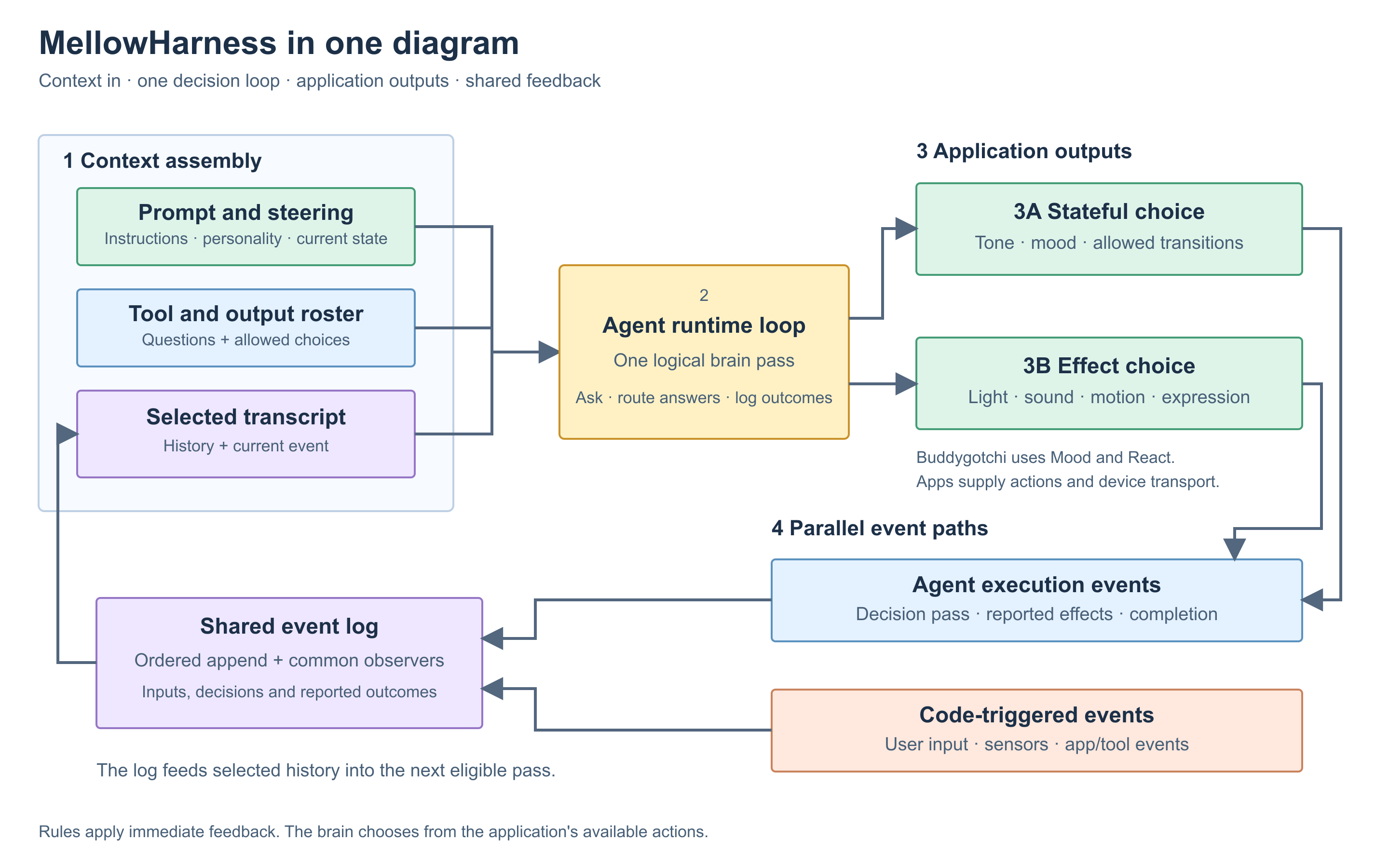
.build/debug/beaconLook for three pieces of context: the authored guide, HISTORY, and NOW. An input turns an event into a readable line. A rule can act immediately; outputs ask questions and apply the returned choices. Their reported outcomes return to the same log.
5. Adapt the loop to your project
Keep the application-specific pieces explicit:
- Inputs: which events matter, how they become readable context, and when they wake the brain.
- Rules: feedback that should happen before a model answers.
- Outputs: the offered questions and the code that applies an answer.
- Guide: the Markdown that gives the application its authored character.
After the scripted path works, you can swap in Jev or implement another Brain. Jev is a hosted API; its key, data handling and pricing belong to TypeSafe. The brain contract explains the integration boundary.
For a physical companion, continue with the ESP32 build guide. For the broader design, read the technical overview.